Showing posts with label Blogger HowTo. Show all posts

The feelings you have as you start up your first blog can probably be

described as equal parts exciting, confusing, and terrifying. Although

it will be awesome to finally have a platform for sharing your thoughts,

ideas, and information, you probably also understand that the process

of launching and maintaining your blog will be no easy feat.
Although building and growing your blog into a successful site can be
pretty difficult, there are several smart moves you can make early on
to set yourself up for success in the future. Here are five smart moves
all first-time bloggers should make as they launch their blogs to
facilitate success later on.

1. Identify your niche audience
One of the biggest mistakes a blogger can make is to neglect their 
blog’s niche. When you start out without a target audience in mind, it 
becomes more and more difficult to develop a target audience over 
time as you create more content.
Before you even start to check out potential designs for your blog, 
consider who your target audience will be and how your content will 
appeal to them. What insights do you have to offer and who might benefit most from them?
Maybe recent college grads would enjoy your humorous posts on post-
grad life. Perhaps working moms could benefit from your time-saving 
tricks and productivity hacks. Find your niche audience and tailor 
your site’s design, content, and social media efforts to fit its unique needs and interests.
If you need a little help identifying your niche, I recommend checking 
out this guide from Elle & Co design.
2. Invest in solid hosting
Although the free hosting offered by website template providers might 
be enticing to a first-time blogger on a budget, it’s important to 
remember that investing a small amount of money per month 
(probably less than $5) in hosting will help you build a secure and 
high performing site. Not to mention, paying for a solid site host will 
allow you to create a custom domain name which will be important for 
brand recognition later on as you work to promote your blog on third-
party platforms.
If you’re not already familiar with the hosting industry, it can be a bit 
difficult to fully understand your options without doing your research. 
I recommend checking out this hosting guide to evaluate your options 
and find a hosting service that will best support the needs of your blog 
as it grows. This can help you identify some solid options that will 
keep your site not only running at optimal performance, but secure 
against potential hacks as well.
3. Track user behaviour
Understanding how your blog’s visitors behave once they land on your 
site will help you understand how you can keep them on your site 
longer and bring them back to view your content later. This is why it’s 
important to enlist the help of analytics tools early and often to 
understand your site’s visitors and what they want and need from you 
over time.
There are many tools you can use to evaluate the behavior of your 
site’s visitors like heat maps, AB testing, and surveys.
Instabug provides a solid list of user behavior tracking tools if you’re 
not familiar with website visitor tracking
4. Monetise your content
One of the most important things to do early on to ensure that your 
blog has a chance of turning a profit for you is to monetize your 
content. This essentially means that you implement sponsored content 
like relevant ads and affiliate links on your site.
A couple of the most common methods bloggers use to monetize their 
AdSense is an ad platform that runs display ads on your site and pays 
you when your site viewers click on one of the ads. Amazon Affiliates 
uses promotional links on your site to promote products within your 
content. For example, if you’re a mommy blogger writing about the 
best baby monitors, you could use an Amazon Affiliate link for the 
baby monitors you recommend to monetize your article.
These are only two of the many ways you can monetize your blog. I 
recommend checking out this guide to learn more about your options.
5. Use third-party platforms to promote yourself

Once you’ve created an optimized site with solid hosting and a target 
audience, it will be time to get out and promote your blog on third-
party platforms. This is an absolutely essential step as potential 
audience members are unlikely to find your site through search 
engines when it’s new.
One way you can promote your site is to exchange content with other 
bloggers. Pitch your ideas to fellow bloggers within your niche and 
offer to write a post or two for them in exchange for a byline that 
promotes your blog.
Social media will also be essential. Whether your platform of choice is 
Instagram, Facebook, Pinterest, or all three, investing in social media 
advertising is essential for bloggers looking to leverage the full 
benefits of social media promotion.
If you’re not sure where to start with putting together a social media 
marketing strategy, I recommend checking out Social Media 
Examiner’s guide for beginners.
Hopefully these five moves will help your site become profitable and 
successful in the future. Are you a seasoned blogger with a tip you’d 
like to add? Share with fellow readers below!

Internet is one of the best applications of a computer. It is one of the emerging markets with a very large scope for economic rise. Companies like Google and Facebook are billion dollar empires that are entirely based on internet. But there is a very tough competition in this field. There are rather new sites going live on the internet every second. Therefore, developers need to work very hard for developing a good site that ranks well. In order to help the developers in building a good website, there are a number of tools available. Hence, we have collected a list of best Google Chrome extensions for web developers to help them maintaining and developing a website. So if you are a developer and you want some tools that would make your work easy, these are the best tools for you.

1. CSS – Shack.

If you want to create powerful web designs, this is a good tool for you. CSS-Shack allows developers to create beautiful web designs and export them to a .css extension. You can therefore use it on your website. It also offers a collection of tools that might look like photo editors.
Add to chrome button icon
css shack

2. DomFlags.

DomFlags is a great and must have in all chrome extensions for web developers that use Dom elements. What this extension does is that it allows developers to set various keyboard shortcuts thus speeding up the designing process. DomFlags helps navigation of elements quite easy.
Add to chrome button icon
domflags

3. Booom!.

If you are a developer that works with Dribbble, booom is a must have extension for you. It does a great deal of work by showing larger shots in lists. It also adds like buttons. Developers can add infinite scroll as well as autoplay options for gifs.
Add to chrome button icon
booom

4. Font Playground.

This Chrome extension has been proven highly valuable to many web developers. It lets you experiment with fonts, both local as well as Google fonts on a webpage without making any actual changes. It also offers font weights, styles as well as many text effects. You can finalise your text style and implement it after visualisation.
Add to chrome button icon
font playground

5. iMacros For Chrome.

Many a times, web developers require testing of webpages. These testings require repetition of a lot of steps again and again. Here, is when iMacros comes to play. It records your actions so you can save them and perform them by a single click. This is really amazing in list of chrome extensions for web developers and designers. This extension saves time as well as effort.
Add to chrome button icon
imacros for chrome
Also Check:- Best Website To Learn Coding Online

6. Window Resizer.

Almost every website today works on a responsive template. The site adjusts all its elements according to the sizes of the screens for various devices. Therefore, for testing the responsive template. It offers all the screen sizes so you can properly test your template with proper accuracy. This is really important in all chrome extensions for web developers and designers now days.
Add to chrome button icon
window resizer

7. Web Developer.

Web developer is a must have chrome extension for web developers and designers out there. It contains various set of different and assorted tools that are very helpful in daily works of any web developer. We highly recommend it as it works flawlessly as well as proves to be very useful.
Add to chrome button icon
web developer extension

8. Yslow.

This developer extension for Chrome checks the speed of how fast your webpage loads. It also tells you what is slowing your page down and how you can optimize it. It works on an algorithm developed by yahoo’s performance team.
Add to chrome button icon
yslow

9. Web Developer Checklist.

This tool allows developers to check a webpage’s performance on various aspects and best practices such as SEO, usability, accessibility as well as page speed. It also notifies about various issues on the webpage that you can fix. It also has a more in depth check list as well.
Add to chrome button icon
web developer checklist

10. DevTools Autosave.

It is a great simple and effective extension for Chrome that developers can use for web development. It automatically saves all changes that developers make in a webpage’s CSS & JS via Chrome Dev Tools to the source file. It is simple to set up and works like a charm.
Add to chrome button icon
devtools autosave


I don't have much stories to tell tonight but if you have large files to download, both on PC and on Android using the Glo unlimited data cheat here is the tip to follow to make it work without unexpected disconnections.

How To Download Large Files With It
To download large files, kindly visit this website muchproxy.com or roogen.com you will see a URL box paste the download link there and click on enter


What you need for this free browsing to work.
  • Download Ucbrowser handler for PC Here
  • Android Users Download Here
  • A modem for your PC or hotspot from your Android phone.


  • Android Users follow this screenshot below


For PC users install the Ucbrowser handler directly then input the following
Realhost: redirect.glo.com
Port:80
Save and start browsing.

please always live your comment. 

Finally, the PSP ISO version PES 2017 is now outed and can be played on both Android and iOS (iPad & iPhone) devices. At least, as a Pro evolution soccer fan, you get to enjoy the PES 2017 on your smartphone.


I believe that most of us are already familiar with installing PSP ISO games on our smartphones, nevertheless, I would still guide you through the process.

How to Install PES 2017 ISO on Android Phones


1.       Firstly, download the Emulator (PPSSPP) which enables you run PSP ISO games on your android device and install.

2.       After that, download the Zipped file (PES 2017.zip) and extract the iso file codenamed “PES 2016-17 LIGA MX BY JOSE.iso” before you can extract the file; you’re required to input the password “PESFUXION2016-17”.

3.       Next, make sure the extracted file is moved to SDCard >> PSP >> GAME.

4.       Once you’ve moved the file, launch your ppsspp emulator, locate the game on the folder you moved it to and play.

For iPhone and other iOS users, you’re advised to follow the guide on “How to install and Play PSP ISO Games on iOS devices” in other to run the game on your iOS smartphone even without jailbreak.

If you encounter any difficulty installing the game, please do let me know via comment section, and I won’t hesitate to assist you.

 
Image result for lock android phone
One major reason why we lock our phones is simply for security sake. Yes it is good to lock your phone but sometimes you forgot your pin, password or pattern and become worried of how to bypass the pin. I was also a victim of this long ago but then I completely wiped my phone in which my important files were lost.
Image result for lock android phone

This morning, I'll quickly show you how you can easily bypass pattern,pin or  password on your android device without flashing your phone kindly open your ears and prepare your minds as I flow the knowledge to you.

What You Need For This To Work
  • A PC windows 7 preferably
  • Vcomm drivers manually installed on your PC if not installed follow this guide here to install it
  • Miracle box download here
  • A USB chord that supports mass storage(that can send files when connected to system)
  • Your brain

How To Make It work
 
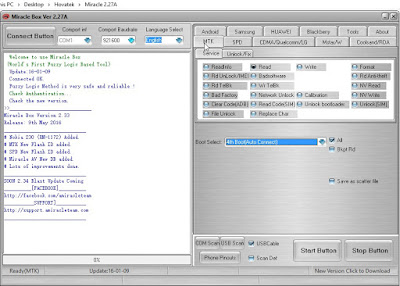
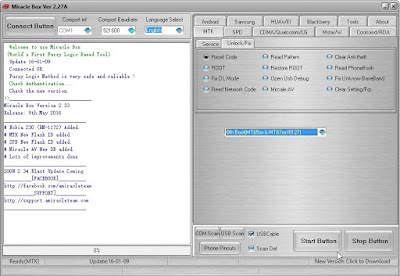
1. Diasble your antivirus otherwise it will delete miraclebox.exe extract miracle box now open miracle box
2. Click on the MTK tab
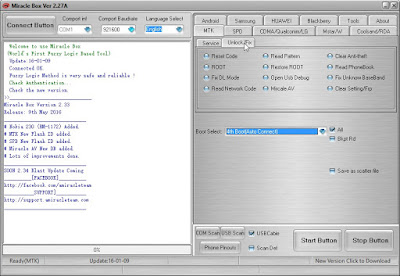
3. Click on the Unlock/fix tab
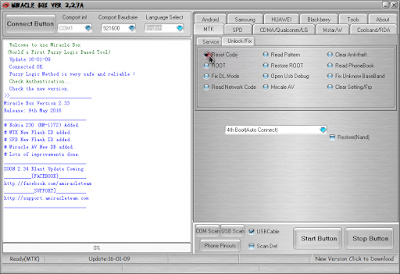
4. Tick the reset code

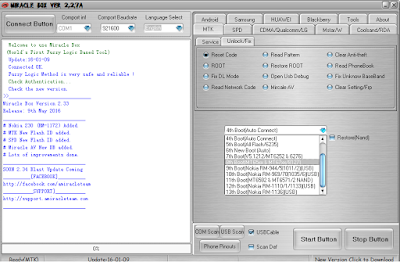
5. Click the dropdown menu to choose your android chipset type MT***
6. Click on the start button
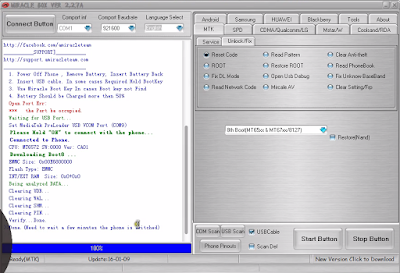
7. Connect your phone to PC make sure it is switched of now (with the battery inside)
 8. press the power button once this will make the phone communicates with the PC do not hold down the power button or else it won't work.
9. Wait till the process is done Disconnect your phone from pc then power it on.
Congratulations you just bypassed your pin, password and pattern unlock. Don't be selfish if you find this post helpful kindly take 10sec of your time to share it with your friends on social media the share button is located at the top and the buttom of the post feel free to share it.
Always live a Comment Before you go

MARI themes

{instagram#Boscy1}
Boscyblog. Powered by Blogger.