Method 1st:- Show Hidden Files With Windows Settings.

Step 1. Plug your pendrive to your computer and wait for few seconds until it shows with your drives.
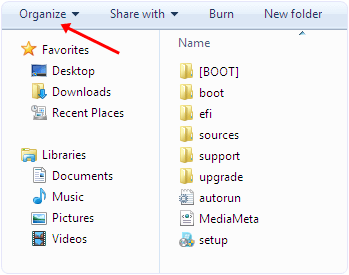
Step 2. Open your pendrive. In Windows 7 and 8 you see organize, share, new folder options etc.
Step 3. Now you have to select organize option then you see a popup sub menu.
organize windows menu tab option
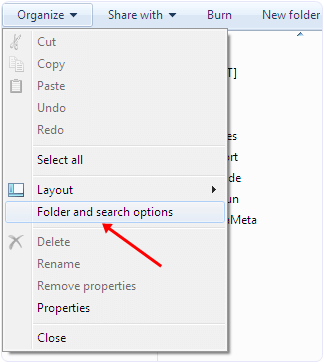
Step 4. In the menu you see among various options you have to click search and folder option.
windows folder and search options
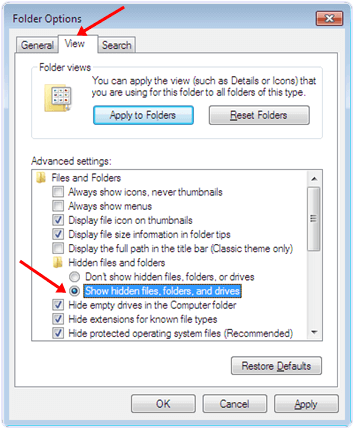
Step 5. Now you see a Window. In the Window there are three tabs General, view, Search.
Step 6. Select the view tab. In the view tab you can see hidden files and folder options.
Step 7. Select the show hidden files and folder option.
windows Show hidden files, folder and drive option
Step 8. Click apply and Ok. Now you can see the hidden files in your pendrive.

Method 2nd:- Show Hidden Files By Using Smadav Antivirus.

Smadav is one of the best antivirus for offline use. It can automatically detect and scan the usb when it is plugged to your computer. It also provide its regular updates. It is one of the best ways to show hidden files in your computer and UBS drive. It can also protect you from various dangerous viruses. It is a light weight software. It also provide the unhide options to show hidden files.
Step 1. Download and install Smadav Antivirus by clicking the button below.
Download ButtonStep 2. Plug your pendrive to your computer and wait for few seconds until it shows with your drives.
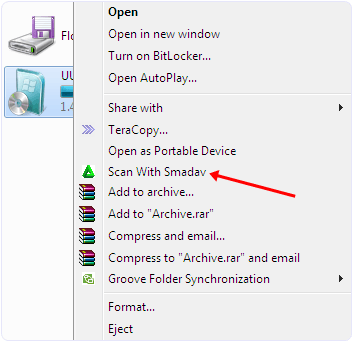
Step 3. Right click on your pendrive and you see a popup menu.
scan pendrive with samdev
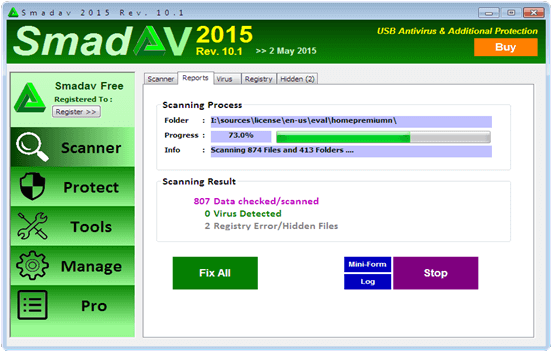
Step 4. In the menu select scan with Smadav option. After that your pen drive start scanning.
sandev antivirus processing hidden files
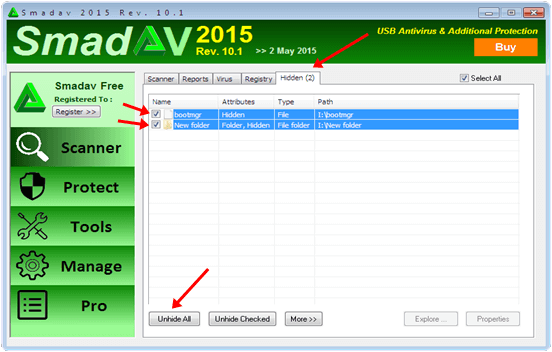
Step 5. After scanning is finish you have to select the hidden tab.
Step 6. In the hidden tab tick the files you want to unhide or you can select unhide all option.
Now hidden files are visible in your pendrive.
sandev antivirus hidden files detected
So these best possible ways to identify and open hidden files and folders in pendrive easily. If you know any of the best method to open hidden files must share in comments.

Image result for window 10 auto update


Method 1st :- Disable Windows 10 Updates From Services.

Step 1. To stop the windows 10 updates you should first go to the control panel.
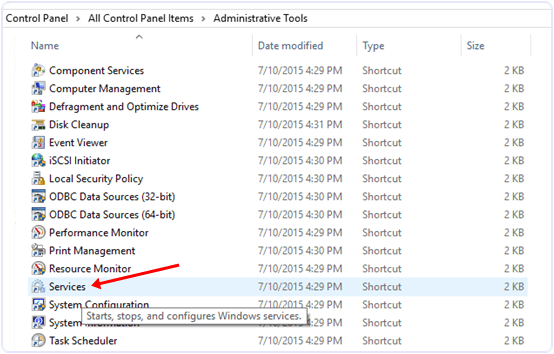
Step 2. In the control panel go to Administrative tools.
Stop Windows 10 updates control panel
Step 3. Then look for services option.
adminstrative tools services
Step 4. In the services window you will see many types of windows services running.
Step 5. In this window scroll down and to find windows update service and turn off it.
control panel adminstrative tools services windows update service
Step 6. To turn of this service you have to right click on the service and click on the properties option.
Step 7. In the properties options select general setting.
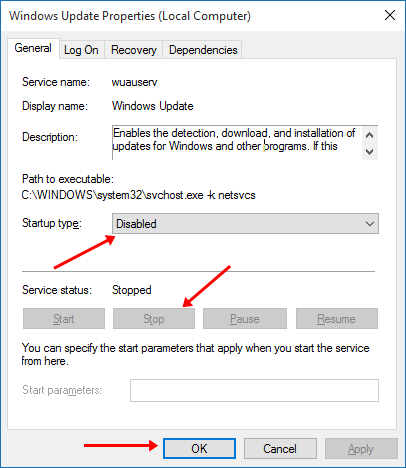
Step 8. In the general setting look for start up type option and select disable option.
Step 9. After that look for service running status and click stop button.
Step 10. Click on OK and your automatic updates will stop after that.
disable windows 10 updates properties settings

Method 2nd:- Disable Windows 10 Updates From Network Settings.

If you have limited internet connection and you want to stop automatic updates of Windows 10 and other Application then you can take advantages of Windows 10 Amazing feature called metered internet connection. By using this feature you can stop Applications and Windows from updates. To set your internet connection as metered you have to follow the below steps.
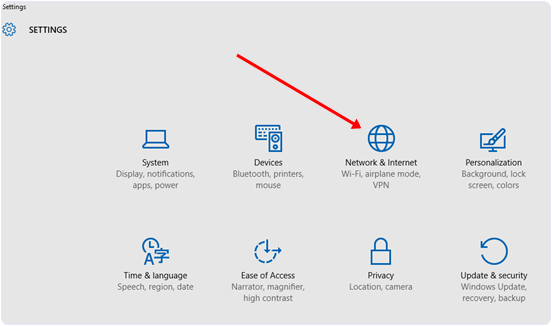
Step 1. Open the settings Apps in Windows 10.
Step 2. After that select Network & Internet.
Stop Windows 10 update settings
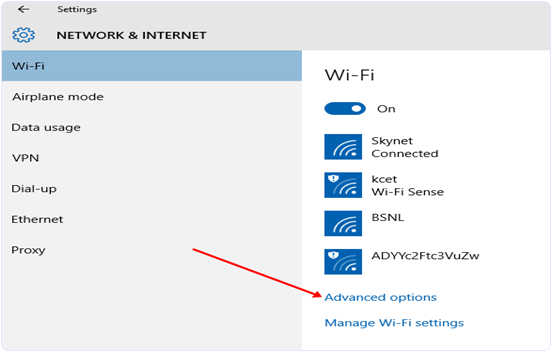
Step 3. After that Scroll down and look for Advanced options.
Stop Windows 10 updates advanced option
 
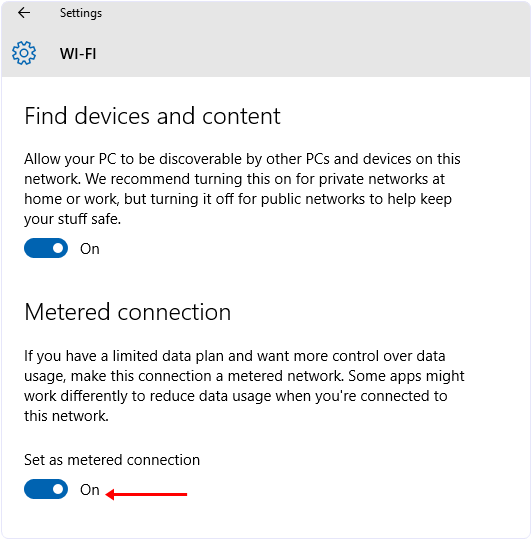
Step 4. Then select the Set as metered connection option.
Stop Windows 10 updates setting meter connection


Hey, Etisalat fans are not exceeded from this trending Nigeria Communication Network Night Plan Bundle which has been the cheapest data plan subscription plan to surf/download the net expecially to Night walkers.
                                               
In tthis post, am going to share more details about the new etisalat Mid-night data plan and some of the frequent ask questions (FAQ).
                                               
What Is Etisalat Night Plan?
It is a data bundle designed for users who prefer accessing the internet in the night. It can be used on any application and to download, stream videos or browse the Internet without throttled speed.

Who Is Eligible? 
Everyone on the etisalat prepaid plan is eligible for this service

What Devices Are Supported?
It works on all devices including Android, java, blackberry 10 devices, Symbian and PC

Browsing Time
Once activated, your night browsing starts by 12 AM and ends by 5AM (night)

What Is The Validity Period? 
It valid for just one night. This means, once subscribed, you will only be able to use it that night alone.

What Is The Price/Cost? 
As at now, it cheapest plan goes for 1gb at 200 Naira only (
night plan).


How To Subscribe For Etisalat Night Plan
To Subscribe for etisalat night plan, make sure you have up to N200 in your etisalat SIM, then dial *229*3*11#* and you will be activated for the plan. 

Enjoy all night browsing Today! Get 1GB data @ N200 to download your favourite TV shows, movies & music from 12am-5am. Dial *229*3*11# Now. Valid/1 night.

I'm pretty sure that you guys are still surfing with Glo N0.0kb free browsing, but the issue

of frequent disconnection and poor network strength are the major concerned, even with

the Terminal Emulator, the connection still not stable. I'm glad to inform you that we have
got a perfect solution to the annoying disconnection issue.


» For steady connection, download Psiphon A+ Pro -

=Download it here =                                                    


Image result for psiphon pro +

Make sure your airtime balance is N0.00kb and stable Glo 3G network is very essencial,

otherwise, you might still experience the disconnecting issues. Also note that you must

be on Glo Pay As You Go (PAYU) plan, if you are not yet on the plan, kindly

text PAYU to 127. Once you received a reply that "you are using data Pay As You Go to

browse. Then you follow the settings below.

» Use the Glo default APN for your phone setting i.e APN should be glosecure and both

username and password should be secure

Launch Psiphon Handler, in the handler menu: 

» Mark remove port 
» Proxy type: Real host
» Proxy server: redirect.glo.com 
» Real Proxy Server Type: SOCKS
»Real Proxy Port: 80 
» Hit the Save button
Immediately you click save, a pop up message will appear

requesting to use Tunnel whole device, just tap on the option to Tunnel Whole Device and

it will take you to the next phase 

» Choose the Option Menu » Under this Option menu,

you will see Select Region, tap and select Best performance

» Go to your More Option settings and untick connect through HTTP Proxy » Go back now

to the main page of the Psiphon A+ Pro and tap the start button below, wait for few

seconds for it to Connect. Then, fire up any browser and any other apps.

Note: You may have to wait for about 20 minutes, before the Psiphon A+ Pro will connect. 


Feel free to comment if you don't understand any part

This are very cool and easy steps to hide Whatsapp image and videos on your android and iphone devices.
Steps For Android Phone Users.


Step 1. Launch the file manager App of your mobile. You can also install different file manager App on Your Android devices like ES file Explorer, total commander File manager App etc.

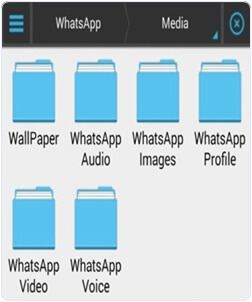
Step 2. Find your WhatsApp media folder using the file manager. Commonly it is found on Home >> SD card

 >> Whatsapp >> Media.

Step 3. Inside the Media folder you will see a sub folder named WhatsApp images.


whatsapp images folder

Step 4. Rename this folder to .WhatsApp images.

rename whatsapp mobile folder

OR 

Alternative Way To Hide Whatsapp Images From Gallery.

Step 4. Alternatively you can also create a .nomedia file inside this folder. You can create new file by clicking on the Plus button and select the file option.

rename whatsapp mobile folder to .nomedia
Step 5. After Step 4 you can open your Gallery and see your Whatsapp folder become invisible. If it is still visible then you have to clear cache for Apps in your Android device

. You can clear cache by Go to setting >> App Manger or Apps >> clear cache. Don.t forget to turn off hidden files option.
Note:- Android OS is based on the Linux kernel if we Add ‘. or period‘ in front of folder or file name it will become completely invisible.

You can download ES File Explorer down bellow

Steps To Hide Whatsapp Images From Gallery (iPhone Users).


If you are iPhone

 user then it is so simple for you to restrict the Whatsapp images Appearing in the Gallery within few clicks.
  • Just go to you phone settings-> Privacy->Photos->Untick WhatsApp.
  • After following the above step you will not see your WhatsApp images in Gallery.

  • whatsapp iphone photo media privacy settings


So these are different method to hide whatsapp image from gallery on android and iPhone

 easily. If you know any of the best way for this must share it with us. We will update it soon.

#1 Screencast-o-Matic.

Screencast-o-Matic is popular software for recording screen. I like Screencast-o-Matic just because of there amazing features and Video quality. Screencast-o-Matic is available in both version Freeware and Paid. Screencast-o-Matic freeware version having some limited access in which you can record upto 15 min video. So we can record videos along webcam also directly publish HD video on YouTube. But the only Screencast-o-Matic-logo
problem is Watermark in Freeware version. In Screencast-o-Matic you can edit video at any frame of second means you cut and add new seen at any frame of second. The overall performance of Screencast-o-Matic is good as compare to others.

#2 CamStudio.

CamStudio logo

CamStudio is another free screen recording software for Windows. CamStudio is light waited and simple software to start recording instantly. CamStudio is able to record all the screen activities and audio on computer. Camstudio is able to create Video file with AVI format and also turn those AVI into Streaming Flash Videos (SWFs). Camstudio is best software for creating short clips and video tutorials. So if want to try Camstudio then download it directly from Official Website of CamStudio.

#3 EzVid.

EzVid logo

EzVid is another best and famous screen recording software. EzVid provides best video quality in its freeware version. EzVid is Coolest screen recorder because of its cutting-edge effects and features. Which includes video recording, Facecam, voice synthesis, screen drawing, speed control these are some the features. All these make it best making videos which entertain, inform and enchant your viewers. In EzVid you can direct upload your video on YouTube just by single click. Since released in 2012 EzVid has been downloaded around millions of times and used to upload videos on YouTube. So if you want to try EzVid download it from official site.

#4 BlueBerry Flashback Express.

BB Flashback Express logo
BB Flashback express is free and useful software for screen recorder and also webcam activities. BB express having clean interface and easy to use which help to create and uploading video easily and instantly. BB express has fine screen recorder compact and high quality video tutorials. After recording video with BB it save files in FBR file format. Which you further and convert into AVI format for sharing and uploading. BB express provide free functioning for 30 days . After that you need to create a new account and register with them to continue using its services.

#5 Camtasia Studio (Paid).

Camtasia Studio logo
Camtasia is most expensive video recording software in market. Camtasia is best and most popular. I just list out this software because of its popularity and features. The above 4 listed software are free to use but Camtasia is only paid and best software. Camtasia is best for screen recording and video editing software published by TechSmith. In Camtasia there are huge number features available for best video creation which you can upload and publish on YouTube and on other network. To download Camtasia visit official site of TechSmith for latest versions.

#6 Tiny Take Screen Recorder.

Tiny Take Screen Recorder PC Software
Tiny Take is one of the best screen capture and Video Recording software for Windows and MAC. It is developed by MangoApps and it is available for free to download. We easily capture pictures and videos of computer screen and easily share with our friends. It can Capture a video up to 120 minutes of our computer screen. It also provide  zoom in and out features and we can easily capture video using web-cam.We can easily  store our screen shot to cloud and share link.

#7 Movavi Screen Recorder.

Movavi Screen Recorder PC Software
It is another Best Software in the list of Best screen Recording softwares for PC.  It is a paid software for PC. It is available for a cost of 29.95 USD. It provide easy to use interface with attractive graphics. It is a light Weight Tool which can capture everything on our screen in high quality video quality. We can easily Export our screen cast video to any desired format. We can save our video at a speed of 60 frames per seconds and set lower speed rate to save our disk space.

#8 Rylstim Screen Recorder.

Rylstim Screen Recorder PC Software
It is also a good software as an alternative to Screen Software for Windows PC. It is freely available for free to download. We can easily Record anything on our Computer screen with just few clicks.  We can easily set screen resolution, Mouse clicking events, frame rates and browse the location for saving our videos etc. It is a light weight tool with easy to use interface. It can not record sound from external input device like microphone.

#9 DVDVideoSoft Free Screen Video Recorder.

DVDVideoSoft Free Screen Video Recorder PC Software
It is another Best Software in the list of Best Screen Video Recording Software for PC. It is compatible with all version of Windows. If you are looking for a free video recording software with simple features then this is best choice for you. We can easily record our screen with sound on the go. It provide our screen recording in AVI format. We can easily highlight our cursor with this tool. We can also capture our screen picture in jpeg, png, bmp, tga etc.

#10 Krut Screen Recorder.

Krut Screen Recorder PC Software
It is another best screen recording Software which is available for Free. It is written in java so it is platform independent. It has a small and easy to use interface. It can record our screen video easily. We can easily set a timer for our recording. we can also preview our on going screen recording. We can also highlight our mouse during recording and hide. It provide recording in two different frame record.
These are best screen recording software for PC which we find useful. There are many more free and paid software available in market. So just try yourself and decide which is best for you.

MARI themes

{instagram#Boscy1}
Boscyblog. Powered by Blogger.