Finally, the PSP ISO version PES 2017 is now outed and can be played on both Android and iOS (iPad & iPhone) devices. At least, as a Pro evolution soccer fan, you get to enjoy the PES 2017 on your smartphone.


I believe that most of us are already familiar with installing PSP ISO games on our smartphones, nevertheless, I would still guide you through the process.

How to Install PES 2017 ISO on Android Phones


1.       Firstly, download the Emulator (PPSSPP) which enables you run PSP ISO games on your android device and install.

2.       After that, download the Zipped file (PES 2017.zip) and extract the iso file codenamed “PES 2016-17 LIGA MX BY JOSE.iso” before you can extract the file; you’re required to input the password “PESFUXION2016-17”.

3.       Next, make sure the extracted file is moved to SDCard >> PSP >> GAME.

4.       Once you’ve moved the file, launch your ppsspp emulator, locate the game on the folder you moved it to and play.

For iPhone and other iOS users, you’re advised to follow the guide on “How to install and Play PSP ISO Games on iOS devices” in other to run the game on your iOS smartphone even without jailbreak.

If you encounter any difficulty installing the game, please do let me know via comment section, and I won’t hesitate to assist you.

Requirements For Windows 10.

1 GB RAM.
1 Gigahertz Processor.
16 GB of Free Hard disk space.
Graphics card: Microsoft DirectX 9 graphics device with WDDM driver.

Improvements In Windows 10.

Improved Command Prompt.
Unified app store.
Multiple desktops.
Return of Start menus.
Advanced menu for settings.
More options for Task View.
Revised File Explorer and icons.
Single platform for smartphones, tablets, and PCs.
New browser, code-named Spartan.
Cortana personal assistant for desktops.

Comparison Between Windows 10 And Windows 8

1. Edge Browser  Edge browser is one of the important feature of the Window 10 which is not available in Windows 8. Edge browser provide you the most optimize speed and feature. Its speed is more fast.
2. Start Menu changes Windows 10 also provide the changes in its design. Windows 10 embed Windows 8 tiles desktop into its start button which give it a more attractive look.
3. Introducing personal assistant Windows 10 introduce a new feature called cortana. Cortana is a Windows 10 personal assistant which provide help about Windows 10. It also provide a way of entertainment. You just need to provide your Email and phone number.It is not available in Windows 8.
windows-10-cortana
4. Multiple Desktops Windows 10 also a provide a special feature called multiple desktop in which we can access multiple desktop, each with a different task.

Steps To Download Window 10 Or Upgrade Windows7, 8 To Windows 10.

1. First of all click on the download now button. Download Windows 10 32 bit and 64 bit. Depend upon your processor click one of the button.
Download Now
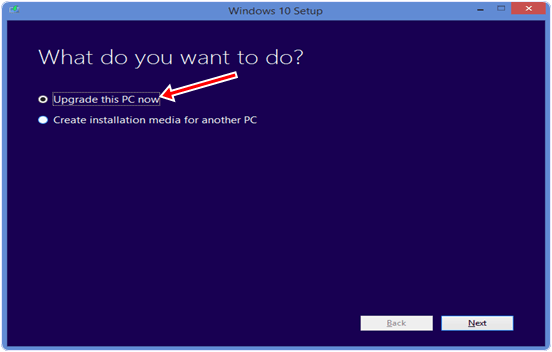
2. After clicking the button your tool will start downloading. You will see the Windows 10 setup wizard with two radio buttons. One is upgrade this PC now and second is Create media installation file for other PC.windows-10-upgrade-pc
4. If you want to upgrade from lower version of Windows like Windows XP, 7, 8 then you have to select first radio button. If you want to download the file then you have to select second radio button. 5. After selecting the update this PC button Windows 10 start downloading and after downloading it will start installing into your PC.
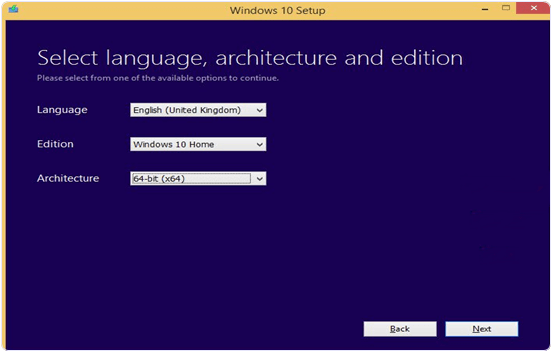
6. If you have valid version of Windows 7 and 8 you do not need an Activation key. After installation it will automatically search for drivers.7. If you want to install on multiple PCs then you have to create an ISO image file or directly burn it into the USB.8. After selecting the create media file button you will see the Windows 10 setup wizard. In this wizard you have to select Language, Edition and CPU architecture.windows-10-select-edition
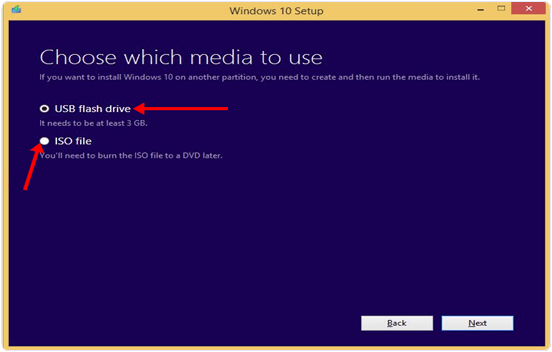
9. Then you have to click on the next button then you see the next wizard. In this wizard you have to select one of two options. One is USB flash drive and second is ISO image. Select the button according to your choice. Then click next button and file start downloading.
windows 10 usb flash drive or iso file
10. Now your Windows 10 is ready install it into different PC.

 
Image result for lock android phone
One major reason why we lock our phones is simply for security sake. Yes it is good to lock your phone but sometimes you forgot your pin, password or pattern and become worried of how to bypass the pin. I was also a victim of this long ago but then I completely wiped my phone in which my important files were lost.
Image result for lock android phone

This morning, I'll quickly show you how you can easily bypass pattern,pin or  password on your android device without flashing your phone kindly open your ears and prepare your minds as I flow the knowledge to you.

What You Need For This To Work
  • A PC windows 7 preferably
  • Vcomm drivers manually installed on your PC if not installed follow this guide here to install it
  • Miracle box download here
  • A USB chord that supports mass storage(that can send files when connected to system)
  • Your brain

How To Make It work
 
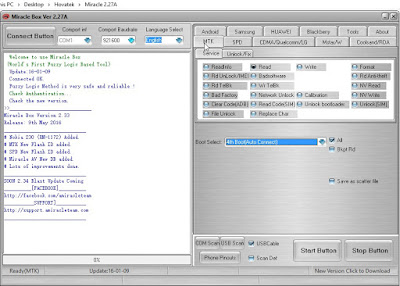
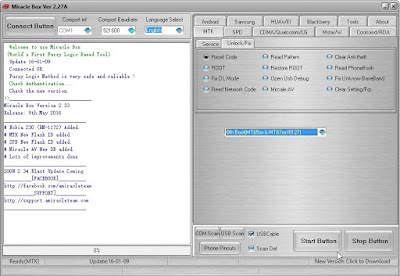
1. Diasble your antivirus otherwise it will delete miraclebox.exe extract miracle box now open miracle box
2. Click on the MTK tab
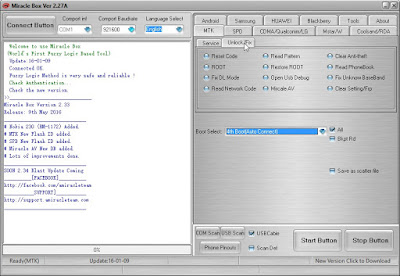
3. Click on the Unlock/fix tab
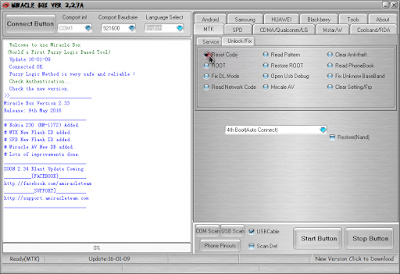
4. Tick the reset code

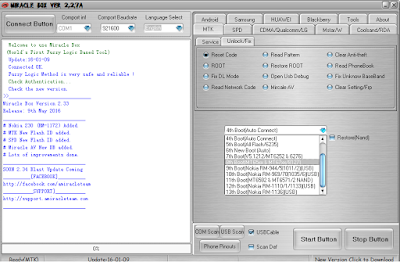
5. Click the dropdown menu to choose your android chipset type MT***
6. Click on the start button
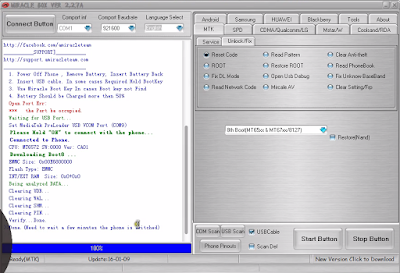
7. Connect your phone to PC make sure it is switched of now (with the battery inside)
 8. press the power button once this will make the phone communicates with the PC do not hold down the power button or else it won't work.
9. Wait till the process is done Disconnect your phone from pc then power it on.
Congratulations you just bypassed your pin, password and pattern unlock. Don't be selfish if you find this post helpful kindly take 10sec of your time to share it with your friends on social media the share button is located at the top and the buttom of the post feel free to share it.
Always live a Comment Before you go

Sometimes, small tasks such as tracking your hardware drivers and updates can be a mess as the majority of the PC users don’t face these sorts of things usually.
 Although you don’t have to deal with these issues on a daily or weekly basis, but these issues is still the vital part of making your computer work flawlessly. Sometimes my “not-so-technical” friends came to me saying that they downloaded some freeware for updating their driver and suddenly their browser home page setting has been changed. Those are merely malware and it is important to find a legit solution to get rid off.
In this review, I’ll present one stop solution for updating your PC drivers efficiently – Driver Talent
Driver Talent Review

Something about Driver Talent

The tool was previously known as the DriveTheLife but later the company changed it to how we know it now. The primary and sole function of this software is to find corrupted, outdated or missing drivers by updating without hassles. The software itself is a home to a lot of features and has a clutter free interface. Some of its salient features are:-
  • This software is able to scan the web and find drivers for Windows XP, Vista, Win8, Win8.1, Win7 and also windows10.
  • You can also backup your currently installed drivers through their program.
  • To make sure you are actually getting updated, you can see and compare the details such as release date and file size of the drivers you are downloading.
Drive Talent Review

How to Setup & Install to get started?

Driver Talent software can be easily downloaded from its official website free of cost. The tool is premium, although the free feature can give you a glimpse of what is it like to use the tool. To use its most awesome features, you would need a license. The point of the free version is to show you its capabilities so that you can make up your mind before purchasing the licensed version.

Why should you install Driver Talent?

  • This software shuts down the computer automatically after installing drivers so that you can know if any update is pending
  • It gives you freedom to choose a different version of driver (i.e. if you want to update a specific version instead of latest one then you can do easily)
  • If the driver doesn’t require an update, it will reinstall the older version.
There is a good reason why you should pay attention to the whole process of updating drivers. One example of how this can be useful is when you are a gamer or a blogger and you need the right set of drivers to test all applications or games.
If you talk about any specific driver, Gamers need their graphic drivers to be up to date so that they have ensured of experiences the best possible performance and least the bugs. You might also need new and updated drivers if the old ones are not working properly anymore or may be causing some trouble for your computer.
Drive Talent Review

Pros of Driver Talent

  • Lightweight and installation process is very quickly (almost in 5 seconds or sometimes less)
  • Driver downloading is done directly through the program and the downloading speeds are quite fast.
  • The drivers have updated automatically and also backed up before their respective installations.
Driver Talent Review

User Testing :- Conclusion

In the initial usage and testing, the software looked nice and the whole interface and usage are simple, easy and clean because it has no adverts inside or extra menus. This indeed makes it much easier to use.
Driver Talent software even has extended version with some impressive features called Driver talent for network Card . This version going to help users to install drivers even without the internet, isn’t interesting? You can download the trial version of Driver Talent for Network card and start your experiment. It is designed to solve wired or wireless network driver problems. It can install WiFi , Ethernet or wired driver even you don’t have internet connections. It is well compatible with Windows 7, 8, 8.1, Vista, 10.1 and Windows server since it is an extended version of Driver Talent so it also includes all those features. I’m sure you will realize this software will give some unique experiences what users yet waiting.
Once you installed, you will find there is a tab named Update and downloads which make you aware of your PC drivers which need to be backed up or repaired. It takes care of even solutions provided by driver talent even absence of internet. This software also backs up the drivers after downloading in case they are not backed up. As per my experiences, all features are mind blowing and I love how it provides the summary of every related driver in our computer and even allows fixing them within one click.
As per Editorial Opinion, I’d definitely suggest our readers to use Driver Talent software in order to save time in search of relevant drivers for your PC. However, this software lacks in providing a bulk download tool (which can be a little bit irritating). Although this software can still be use as it takes away loads while searching drivers and update them manually.

Method 1st:- Show Hidden Files With Windows Settings.

Step 1. Plug your pendrive to your computer and wait for few seconds until it shows with your drives.
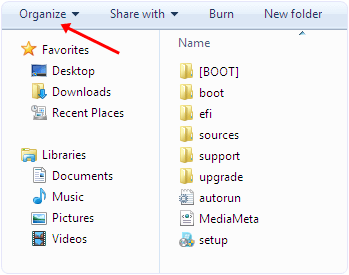
Step 2. Open your pendrive. In Windows 7 and 8 you see organize, share, new folder options etc.
Step 3. Now you have to select organize option then you see a popup sub menu.
organize windows menu tab option
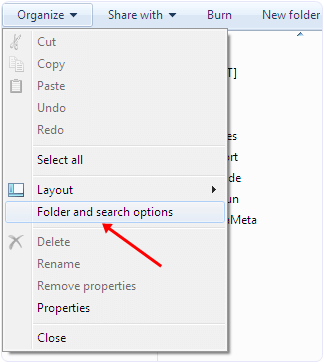
Step 4. In the menu you see among various options you have to click search and folder option.
windows folder and search options
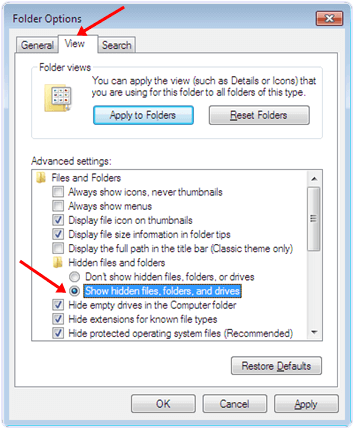
Step 5. Now you see a Window. In the Window there are three tabs General, view, Search.
Step 6. Select the view tab. In the view tab you can see hidden files and folder options.
Step 7. Select the show hidden files and folder option.
windows Show hidden files, folder and drive option
Step 8. Click apply and Ok. Now you can see the hidden files in your pendrive.

Method 2nd:- Show Hidden Files By Using Smadav Antivirus.

Smadav is one of the best antivirus for offline use. It can automatically detect and scan the usb when it is plugged to your computer. It also provide its regular updates. It is one of the best ways to show hidden files in your computer and UBS drive. It can also protect you from various dangerous viruses. It is a light weight software. It also provide the unhide options to show hidden files.
Step 1. Download and install Smadav Antivirus by clicking the button below.
Download ButtonStep 2. Plug your pendrive to your computer and wait for few seconds until it shows with your drives.
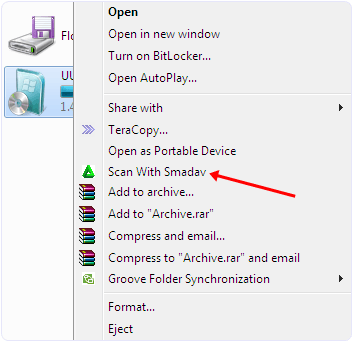
Step 3. Right click on your pendrive and you see a popup menu.
scan pendrive with samdev
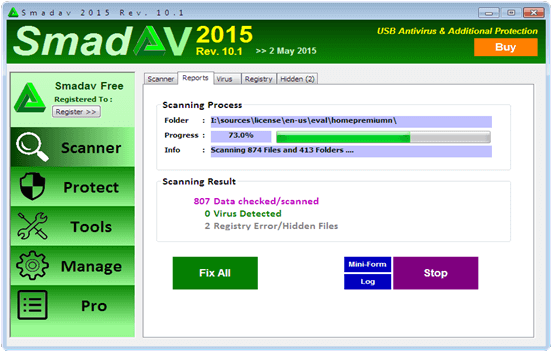
Step 4. In the menu select scan with Smadav option. After that your pen drive start scanning.
sandev antivirus processing hidden files
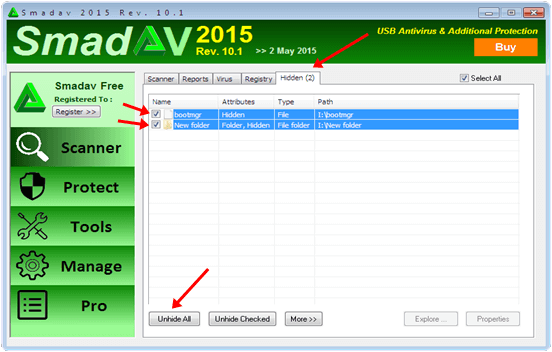
Step 5. After scanning is finish you have to select the hidden tab.
Step 6. In the hidden tab tick the files you want to unhide or you can select unhide all option.
Now hidden files are visible in your pendrive.
sandev antivirus hidden files detected
So these best possible ways to identify and open hidden files and folders in pendrive easily. If you know any of the best method to open hidden files must share in comments.

Image result for window 10 auto update


Method 1st :- Disable Windows 10 Updates From Services.

Step 1. To stop the windows 10 updates you should first go to the control panel.
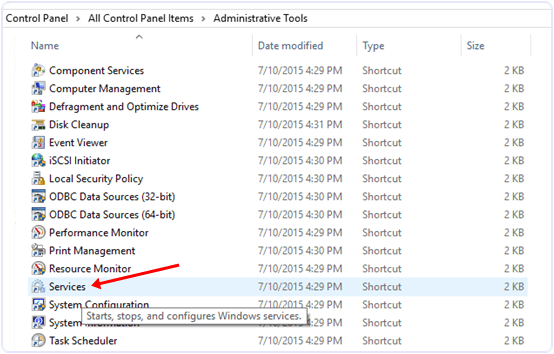
Step 2. In the control panel go to Administrative tools.
Stop Windows 10 updates control panel
Step 3. Then look for services option.
adminstrative tools services
Step 4. In the services window you will see many types of windows services running.
Step 5. In this window scroll down and to find windows update service and turn off it.
control panel adminstrative tools services windows update service
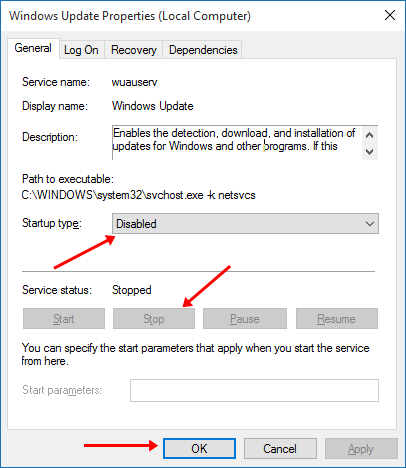
Step 6. To turn of this service you have to right click on the service and click on the properties option.
Step 7. In the properties options select general setting.
Step 8. In the general setting look for start up type option and select disable option.
Step 9. After that look for service running status and click stop button.
Step 10. Click on OK and your automatic updates will stop after that.
disable windows 10 updates properties settings

Method 2nd:- Disable Windows 10 Updates From Network Settings.

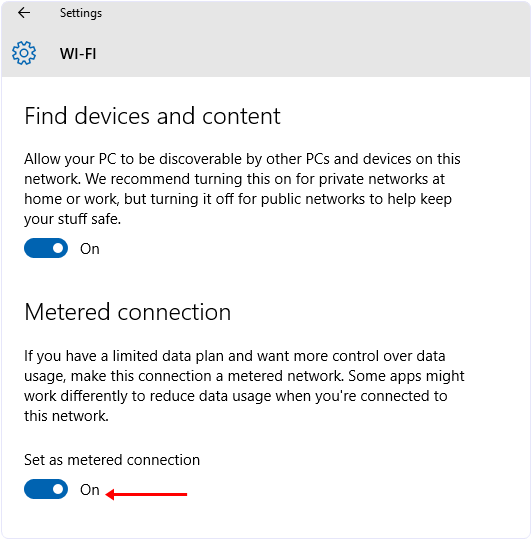
If you have limited internet connection and you want to stop automatic updates of Windows 10 and other Application then you can take advantages of Windows 10 Amazing feature called metered internet connection. By using this feature you can stop Applications and Windows from updates. To set your internet connection as metered you have to follow the below steps.
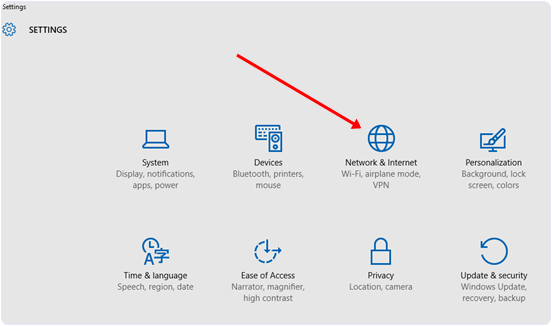
Step 1. Open the settings Apps in Windows 10.
Step 2. After that select Network & Internet.
Stop Windows 10 update settings
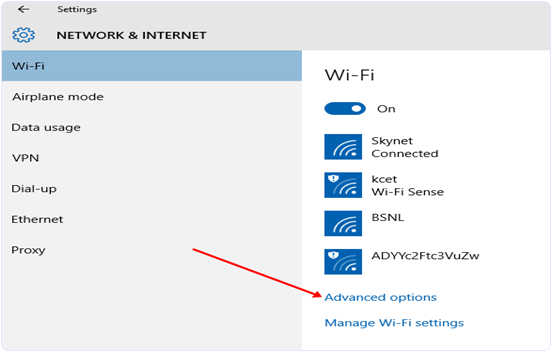
Step 3. After that Scroll down and look for Advanced options.
Stop Windows 10 updates advanced option
 
Step 4. Then select the Set as metered connection option.
Stop Windows 10 updates setting meter connection


Hey, Etisalat fans are not exceeded from this trending Nigeria Communication Network Night Plan Bundle which has been the cheapest data plan subscription plan to surf/download the net expecially to Night walkers.
                                               
In tthis post, am going to share more details about the new etisalat Mid-night data plan and some of the frequent ask questions (FAQ).
                                               
What Is Etisalat Night Plan?
It is a data bundle designed for users who prefer accessing the internet in the night. It can be used on any application and to download, stream videos or browse the Internet without throttled speed.

Who Is Eligible? 
Everyone on the etisalat prepaid plan is eligible for this service

What Devices Are Supported?
It works on all devices including Android, java, blackberry 10 devices, Symbian and PC

Browsing Time
Once activated, your night browsing starts by 12 AM and ends by 5AM (night)

What Is The Validity Period? 
It valid for just one night. This means, once subscribed, you will only be able to use it that night alone.

What Is The Price/Cost? 
As at now, it cheapest plan goes for 1gb at 200 Naira only (
night plan).


How To Subscribe For Etisalat Night Plan
To Subscribe for etisalat night plan, make sure you have up to N200 in your etisalat SIM, then dial *229*3*11#* and you will be activated for the plan. 

Enjoy all night browsing Today! Get 1GB data @ N200 to download your favourite TV shows, movies & music from 12am-5am. Dial *229*3*11# Now. Valid/1 night.

MARI themes

{instagram#Boscy1}
Boscyblog. Powered by Blogger.